ChatGPT is still a great option in 2026 if you want a single AI helper that can perform a variety of tasks. The most recent models provide excellent writing quality, reliable code assistance, and surprisingly sound reasoning for routine tasks. Although the free tier is generous, the subscription plans—which grant access to better models, larger limits, and more sophisticated features—are where the true power lies.
It’s not flawless: team features lag behind some specialist tools, real-time information isn’t always dependable, and hallucinations still occur. However, ChatGPT remains the most user-friendly “first AI” and one of the top all-arounders available.
What is ChatGPT?
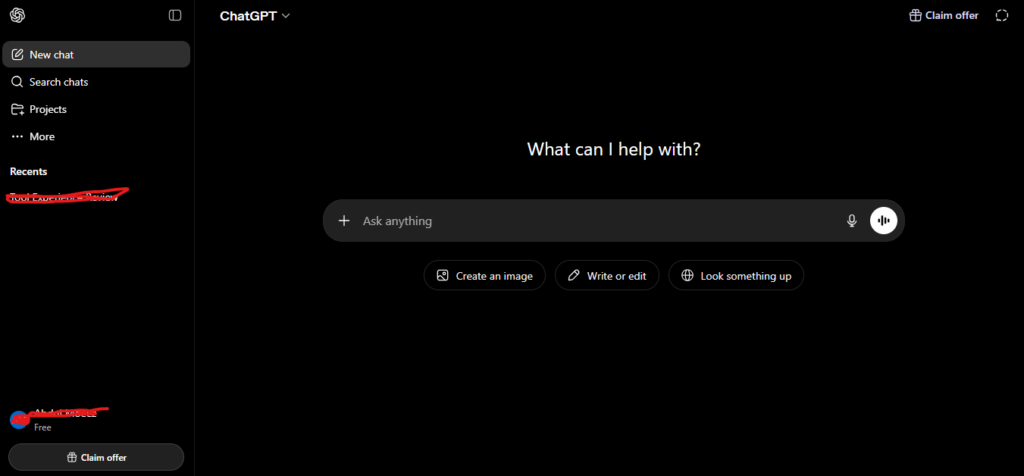
OpenAI’s ChatGPT is an AI chatbot that allows you to communicate in natural language, ask questions, and offer commands. Large language models from the GPT family, which are trained on enormous volumes of text and other data, enable the system to produce responses that resemble those of a human, write and debug code, summarize lengthy texts, and assist with activities requiring language and logic.
The service began as a study preview in late 2022 and swiftly developed into a complete product that is utilized by businesses, consumers, and schools. It is now available in dozens of languages via the web app, mobile apps, desktop integrations, and an API for developers. It is driven by OpenAI’s GPT-5.1 engine in the background, which can operate with text, photos, and audio.
Key Features
By 2026, ChatGPT has evolved from a basic chatbot to a comprehensive productivity and research assistant with capabilities for writing, coding, multimodal input, customisation, and automation. You may go from brief replies to complete project-level work in one location by combining conversational responses with a toolkit of modes like online search, deep research, data analysis, and speech.
Core Chat and Writing
Fundamentally, ChatGPT remains a conversational writer and editor capable of creating, editing, and summarizing content in a variety of formats, including blog entries, emails, social media copy, scripts, support responses, and more. You can ask it to adapt text for various audiences and reading levels, change tone, modify length, or simplify jargon.
Coding and Technical Help
ChatGPT can be used by developers and technically interested people as an AI companion programmer to assist with small and medium-sized coding jobs during their entire lifecycle. While still requiring you to run and validate the code yourself, it can produce samples, explain unfamiliar libraries, offer improvements, and assist you in weighing trade-offs.
For learners and Junior Devs
To maintain control over quality and security, use ChatGPT to decipher error messages, walk through algorithms, and transform pseudocode into functional examples. Then, run the code locally.
For Experienced Engineers
Keep important design choices, reviews, and production modifications in human hands and use it as a quick assistant for boilerplate, documentation, test scaffolding, and rapid prototyping.
Multimodal Capabilities (text, images, files)
More recent iterations of ChatGPT are completely multimodal, allowing you to communicate with it via voice, text, images, and submitted files. This means that it can analyze charts or UI screenshots, read PDFs, spreadsheets, PowerPoint, and code files, and in many plans, create or modify graphics based on your instructions.
Customization and Memory
Through memory, project-level context, and custom instructions, ChatGPT may gradually adjust to you. When memory is enabled, it can automatically apply choices you select to store—such as your role, writing style, or recurring projects—in subsequent discussions until you modify or remove them.
Integrations and Ecosystem
ChatGPT connects to a larger ecosystem of tools and services in addition to the main app. The same models may be embedded into help desks, document tools, CRMs, note-taking apps, and automation platforms using the OpenAI API and native integrations, allowing users to receive ChatGPT-style support without ever visiting the standalone interface.
Hands-on Experience: How We Tested ChatGPT
Demos and specs were not our only sources of information. We integrate ChatGPT into the same types of workflows—content creation, coding, knowledge work, and self-study—that small teams and lone professionals use on a daily basis. We examined quality, speed, dependability, and the extent to which human editing or supervision was still necessary for each situation.
How We Ran Our Tests
We tested both the free tier and paid tiers with GPT-5.1 and related models using ChatGPT in both online and mobile applications. Instead of using artificial standards, each test run used actual prompts based on tasks from marketing, engineering, operations, and education.
Content Creation and Marketing
We requested that ChatGPT produce blog outlines, long-form drafts, social updates, landing page copy, and email sequences for campaigns and content. Although it was often a little generic right out of the box, the model consistently produced clear structure and safe, neutral language, making it easy to polish.
Coding and Technical Tasks
Instead of using ChatGPT as a complete substitute for engineering workflows, we used it as a helper for routine coding. We asked it to walk through error messages in languages like PHP, Python, and JavaScript, create minor tools, modify methods, and explain new APIs.
Business Productivity and Knowledge Work
We asked ChatGPT to generate internal documentation, rewrite email threads, summarize meeting notes, and assist with project planning in order to replicate routine office tasks. For busy workers who manage a lot of written communication, this is where the assistant seems most like a force multiplier.
Learning and Research Assistance
We used ChatGPT as a study partner and tutor for learning. We requested it to summarize articles and technical documents, test us on new subjects, and explain complicated concepts at various levels. Instead of using it as the sole reference, it was most effective when we coupled it with external sources.
Performance and Output Quality
Overall, ChatGPT performs well for daily tasks in 2026: it produces clear copy, manages typical reasoning tasks effectively, and reacts fast enough to keep up with the flow. It can still fabricate facts, oversimplify sources, or overlook crucial disclaimers when it comes to specialist subjects and high-stakes questions.
Writing Quality and Tone
The majority of ChatGPT’s work is coherent, well-organized, and devoid of simple grammatical errors. It has a neutral, businesslike tone by default, but when you provide clear examples or style guidelines, it can emulate other styles. The best outcomes come from adding a point of view and then making little edits since if left on autopilot, it may sound corporate or generic.
Reasoning and Accuracy
ChatGPT is excellent for structured problem solving and everyday thinking since it can compare possibilities, break down tasks into steps, and clearly explain trade-offs. Newer models, such as GPT-5 and GPT-4o, still make systematic errors in controlled tests, although they typically outperform previous ChatGPT versions on benchmarks and coding or analysis tasks.
Speed and Reliability
ChatGPT reacts to standard prompts fast enough to feel interactive rather than batch processed. For the majority of customers, especially on paid plans, GPT-5 and GPT-5.1 are faster and more reliable than previous versions; nonetheless, system load and task complexity still affect performance.
User Experience
I have been using this tool for the two years. This tool has made a lot of work easier and more automated for my clients. I have also used this tool to help students with their assignments and other tasks. When I started my business this tool helped me find and figure out things.
A months ago I built an app and this tool did about 95 percent of the work especially with the help of this tool.
This tool is very good. The pricing of this tool is also reasonable. This tool improves your lifestyle. Helps with many small everyday tasks like this tool does. This tool is really helpful, for doing things and this tool makes life easier.
ChatGPT Pricing & Plans
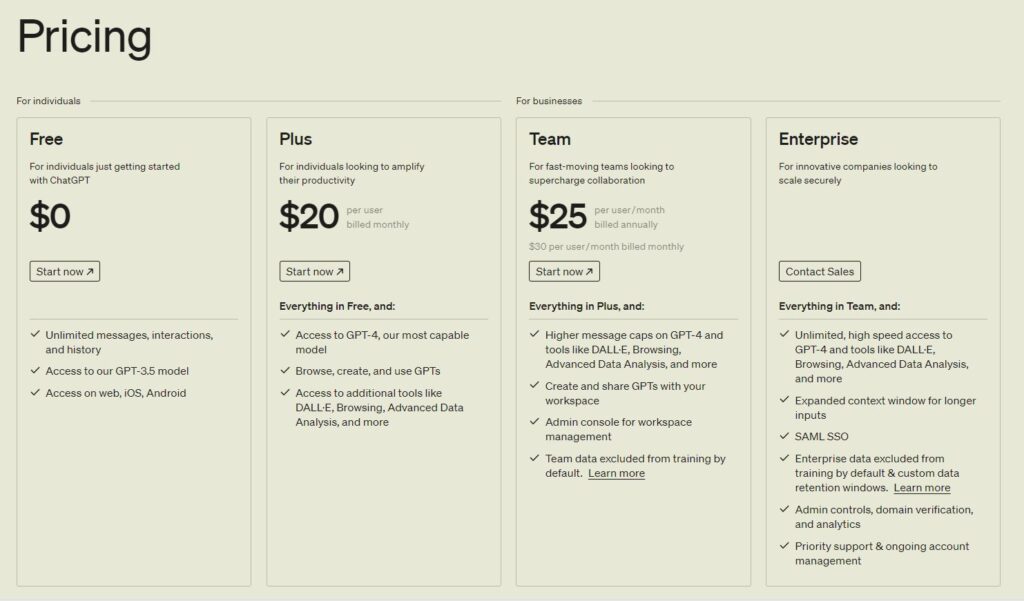
In addition to a number of subscription options targeted at higher consumption, more robust models, and business-grade capabilities, ChatGPT offers a substantial free tier. Treat this as a high-level summary and always read the official ChatGPT pricing page before making a purchase, as prices and restrictions are subject to frequent changes.
Free Plan
Cost: $0 each month. You can browse ChatGPT, create content, ask questions, and try voice or search with the free plan. Capable models and essential functionality are provided, however there are more frequent caps or delays during peak times, tighter restrictions, and slower image production.
Plus (Individual) Plan
Cost: $20 each month. Additionally, it provides access to capabilities like projects, tasks, and custom GPTs, faster picture production, richer memory and context, higher and more dependable usage limitations, and advanced reasoning with GPT-5.1. For the majority of lone professionals who use ChatGPT on a regular basis, it is the ideal choice because it offers restricted access to Sora 1 video generation and a coding agent.
Pro Plan
Cost: $200 per month. With priority-speed picture and code generation, maximum deep research, the most generous context window, “unlimited” messages and uploads (subject to abuse guardrails), and early access to new features, Pro is made for power users who push ChatGPT hard. If you frequently hit Plus limitations and depend on ChatGPT as a primary work tool on a daily basis, it’s attractive but overkill for casual use.
Business Plan
Monthly fee per user: $25 (paid annually). All of Plus’s features are included in Business, along with a safe, dedicated workspace with business expertise, integrations to Slack, Google Drive, SharePoint, and GitHub, and collaboration tools like shared projects, tasks, and workplace GPTs. Along with encryption and a default policy that prohibits the use of your company’s data for training, you also receive admin controls, SAML SSO, MFA, and assistance that complies with common standards like GDPR and SOC 2.
Enterprise Plan
Cost: bespoke, thru sales. With bigger context windows for lengthy documents and huge files, sophisticated security and governance (SCIM, EKM, domain verification, role-based access restrictions, bespoke data retention, and regional data residency options), and round-the-clock priority support with SLAs, Enterprise expands on Business. Larger or highly regulated businesses that require strict control over data, compliance, and uptime are the target audience.
AI Tool Spots is a technology-focused platform dedicated to sharing the latest updates in Artificial Intelligence, software tools, automation, SEO, and digital innovation. We publish informative guides, honest reviews, tech tutorials, and valuable resources to help bloggers, entrepreneurs, marketers, and tech enthusiasts stay ahead in the digital world. Learn more at aitoolspots.com.