If you’re reading this Notion AI review because you’re wondering whether it’s worth upgrading your plan in 2026, let me save you the hours of guesswork — I spent an entire month using Notion AI across real daily tasks before writing a single word here.
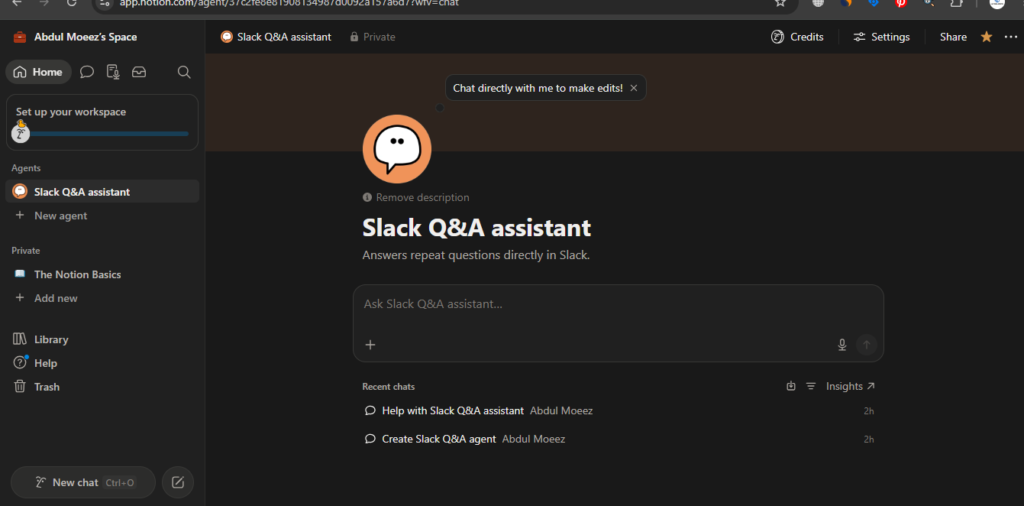
I tested Notion AI writing assistance, AI agents, document summarization, team collaboration features, and even the newer Custom Agents that launched in February 2026. Everything you’ll read below is based on actual hands-on experience, not feature screenshots or marketing copy.
Answer Is Notion AI is genuinely impressive — but only if you’re already living inside Notion. Let me explain exactly why.
What Is Notion AI? (Quick Overview)
Notion is a workspace platform that combines notes, documents, databases, wikis, and project management into one environment. It was founded in 2022 and has since grown to over 150 million users worldwide, with more than 80% of Fortune 800 companies using it in some form.
Notion AI is the artificial intelligence layer built directly into that workspace. Unlike standalone AI tools like ChatGPT, Notion AI doesn’t just generate generic content — it reads your existing pages, databases, and notes to give you context-aware assistance. In September 2025, Notion launched version 3.0 rebuilt around autonomous AI agents capable of multi-step work. By February 2026, they shipped Custom Agents — team-wide bots that run on schedules and triggers across your entire workspace.
That’s the product I tested for a month. Here’s what I found.
My Experience 1-Month Testing
1st Week I started week one with the basics, using Notion AI’s writing assistant to draft project briefs, summarize long meeting notes, and clean up messy first drafts. The results were clean and contextually accurate in a way that impressed me immediately. Unlike pasting text into ChatGPT, Notion AI already knows what’s on your page. I didn’t have to copy-paste context. I just pressed the spacebar, typed a prompt, and got results that actually fit the document I was already building.
2nd Week I moved into the Ask Notion feature — the workspace Q&A that lets you ask questions across all your pages and databases at once. I asked him things like “What were the action items from last week’s client call?” and “Which projects are currently in review?” It pulled answers accurately from pages I hadn’t visited in weeks. That kind of retrieval saved me genuinely meaningful time.
3rd Week is when I pushed deeper into AI Agents and the new Custom Agents. I set up a simple agent to automatically pull updates from a linked database and compile a weekly summary every Monday morning. The setup wasn’t instant — it took me about 45 minutes to configure it properly — but once it ran, it worked exactly as expected. No manual copy-pasting, no checking five different pages. Just a clean summary waiting for me.
4th Week I had a clear picture of both where Notion AI shines and where it frustrates. More on both of those below.
Key Features of Notion AI in 2026
1. AI Writing Assistant
The core feature, and it’s solid. You can use it to:
- Draft new content from scratch
- Rewrite or improve existing paragraphs
- Fix grammar and spelling
- Change the tone (formal, casual, confident)
- Translate text into other languages
- Summarize long pages into bullet points
I used it daily for the first two weeks. The summaries were consistently accurate, and the rewriting suggestions felt natural rather than robotic. It’s not as powerful as a dedicated writing tool like Grammarly for grammar, or Jasper AI for long-form generation, but for workspace use it handles most tasks well.
2. Ask Notion (Workspace Q&A)
This is arguably the most useful feature for anyone managing a knowledge base. You can type a natural language question and Notion AI searches across your entire workspace to find the answer — pulling from pages, databases, comments, and even connected apps.
During my testing, it answered questions about project statuses, past decisions, and even client requirements stored in old documents. The accuracy was strong as long as the information was clearly written in the first place. Vague or poorly structured pages gave vague answers — which is a fair limitation.
3. Custom AI Agents
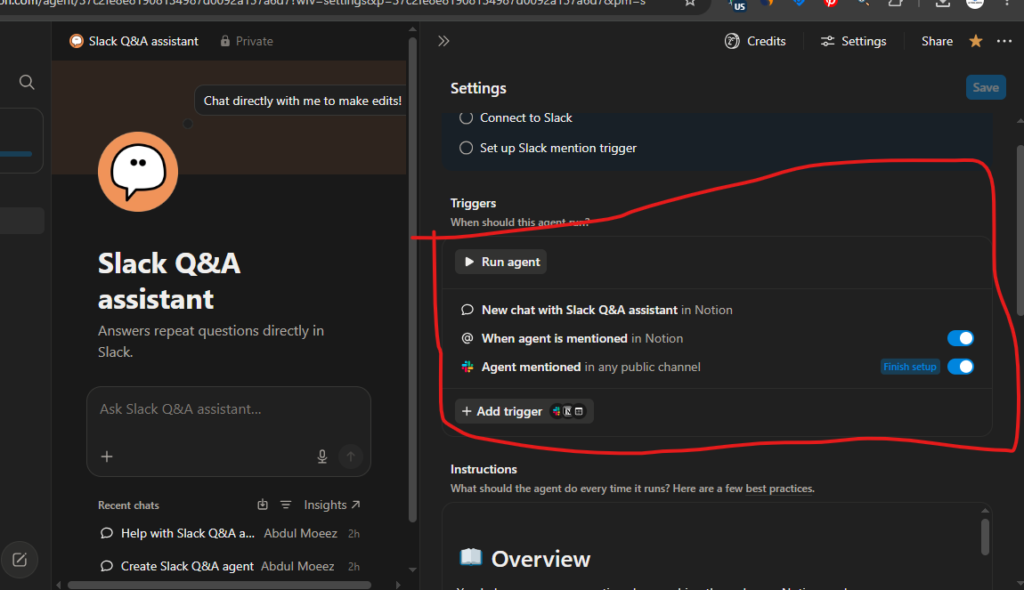
Custom Agents are Notion’s biggest 2026 upgrade. These are team-wide bots that can be scheduled or triggered to run multi-step tasks autonomously — updating database entries, summarizing content, creating new pages, and routing information. I built one that monitored a project tracker and auto-generated status reports. Once set up correctly, it saved me around 2-3 hours per week.
The important caveat: Custom Agents now require Notion Credits (since May 4, 2026), purchased separately at $10 per 1,000 credits on top of your Business plan. For light users this isn’t a major cost, but heavy agent workflows can add up quickly.
4. Enterprise Search & App Connectors
Notion AI can search across connected external apps, not just your workspace. As of May 2026, the connector list includes Slack, Google Drive, GitHub, Jira, Microsoft Teams, OneDrive, SharePoint, Salesforce, and Box. I connected Slack and Google Drive during my testing month, and the cross-app search worked well — especially pulling Slack threads related to active Notion projects. This is genuinely powerful for teams that use multiple tools.
5. AI Meeting Notes
Notion AI can transcribe meetings in the background on both iOS and Android, even when your screen is locked. I used this feature in three video calls during the month. The transcriptions were accurate enough that I only needed to do minor cleanup before sharing the notes. Auto-generated action items from the meetings were a nice bonus.
6. Multi-Model Access
On the Business plan, you’re not locked to one AI model. Notion AI supports GPT-5, Claude Opus 4.1, o3, and o1-mini — letting you choose the model that fits each task. I found GPT-5 strong for structured writing and Claude Opus 4.1 better for nuanced summarization, though the differences were subtle for most everyday tasks.
Notion AI Pricing in 2026
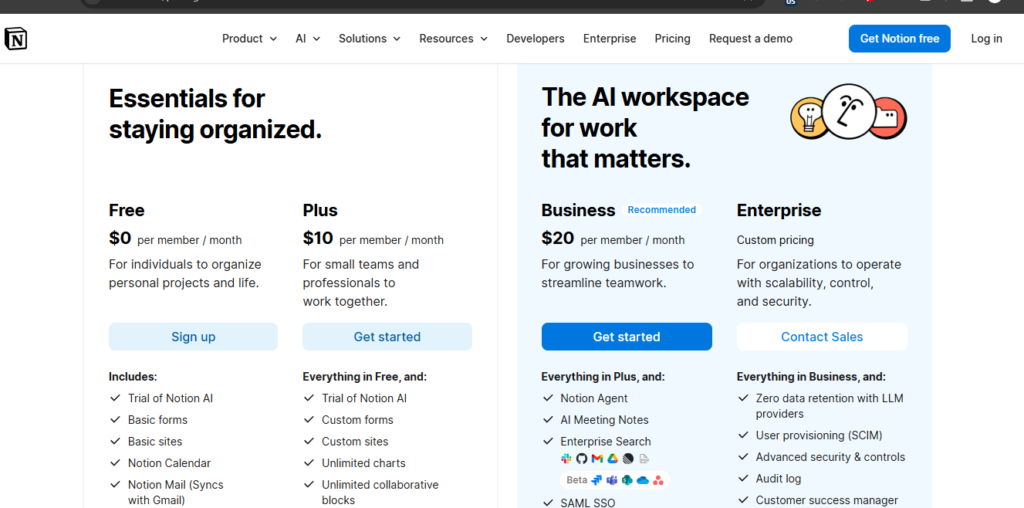
This is the most important section for anyone making a decision, because Notion’s pricing changed significantly in May 2025 — and many reviews still describe the old model.
Here’s the actual 2026 pricing structure:
| Plan | Price | AI Access |
| Free | $0/month | Limited trial only (~50 AI responses) |
| Plus | $10 /user/month (annual) | Limited trial only — no full AI |
| Business | $20 /user/month (annual) | Full Notion AI bundled |
| Enterprise | Custom pricing | Full AI + data residency + zero data retention with LLMs |
| Notion Credits | $10 per 1,000 credits | Required for Custom Agent usage |
The key thing to understand: Free and Plus no Longer include meaningful AI access. The standalone AI add-on that existed before May 2025 has been removed for new users. Full AI — including Custom Agents, Enterprise Search, AI Meeting Notes, and multi-model access — requires the Business plan at $20/user/month on annual billing.
For solo users or small teams on a budget, this is a real barrier. The Plus plan at $10/month might feel like a reasonable step up, but you’ll hit the AI trial cap almost immediately and be asked to upgrade again.
For teams already investing in a productivity platform, $20/seat with full AI bundled in is actually reasonable — especially compared to paying for Notion Plus + a separate AI tool.
Who Should Use Notion AI?
Based on a full month of actual use, here’s my honest breakdown:
Great for:
- Teams already using Notion — the AI layer adds serious value when your workspace is organized and your content is already there
- Project managers who need to track status, pull summaries, and reduce reporting overhead
- Remote teams managing complex knowledge bases across multiple tools
- Students with .edu emails (Notion offers the Plus plan free through its education program)
- Content creators and freelancers managing multiple clients and project workflows inside Notion
Not ideal for:
- Solo users on a budget — the Business plan at $20/month is a steep entry price for individual use
- Bloggers and SEO writers needing specialized long-form content generation — tools like Jasper AI or Surfer AI are better for that purpose
- Users who need offline access — Notion still has no offline mode, which is a persistent frustration
- Anyone starting from scratch — if you don’t already have an organized Notion workspace, the AI doesn’t have much to work with.
Notion AI Pros and Cons
Pros
- AI is deeply embedded in the workspace — no copy-pasting context into a separate tool
- Ask Notion Q&A is a genuinely powerful feature for knowledge retrieval
- Custom Agents automate real multi-step workflows, not just text generation
- Multi-model access (GPT-5, Claude, o3) gives flexibility for different tasks
- AI Meeting Notes transcription works reliably in the background
- External connectors (Slack, Google Drive, Jira, Salesforce) make it a central hub
- Data is not used to train AI models — an important privacy commitment
Cons
- Full AI requires Business plan at $20/user/month — Free and Plus tiers get almost nothing
- Custom Agents now require additional Notion Credits on top of the subscription
- Performance degrades noticeably with large databases (10,000+ rows)
Best Notion AI Alternatives
Notion AI vs ChatGPT: Which Should You Use?
This comparison came up constantly during my testing month, so it’s worth addressing directly.
Notion AI wins when:
- You want AI that understands your existing notes, projects, and databases
- You need to retrieve past information or summarize stored content
- You’re managing team workflows and want automation inside the same tool
ChatGPT wins when:
- You need raw creative writing, complex reasoning, or real-time research
- You’re not a Notion user and don’t want to pay for a workspace just to access AI
- You need deep, flexible conversations rather than workspace-specific tasks
My Practical Answer: If you are already paying for Notion, upgrading to Business for the full AI is worth it. If you’re not a Notion user, ChatGPT delivers more raw AI capability per dollar as a standalone tool.
Notion AI vs ClickUp Brain: How Does It Compare?
For teams choosing between productivity platforms, ClickUp Brain is the most direct competitor to Notion AI in 2026. ClickUp bundles AI into its paid plans starting at lower per-seat costs, and it has stronger native project management features. However, Notion is more flexible for knowledge management and document-heavy workflows. If your team is task-and-sprint focused, ClickUp is worth evaluating. If you’re building a deep knowledge base or internal wiki, Notion still leads.
Is Notion AI Worth It in 2026?
After a 1 month of daily use, here is my honest verdict:
Notion AI is worth it — but only for the right user.
If your team already lives inside Notion, upgrading to the Business plan at $20/user/month to unlock full AI is a genuinely smart investment. The Custom Agents alone can save 2-3 hours per week once configured. Ask Notion turns your knowledge base into a searchable, conversational assistant. And the AI writing tools mean you rarely need to leave the workspace to get help.
However, if you’re an individual user on a tight budget, or you’re primarily looking for a standalone AI writing tool, Notion AI is not the right choice. The $20/month minimum entry for full AI is hard to justify for personal use when tools like ChatGPT or Grammarly offer strong AI at lower price points.
My Rating: 4.4/5
Frequently Asked Questions
Is Notion AI free in 2026?
Not in any meaningful way. Free and Plus plans include only a limited trial of approximately 20 AI responses. Full Notion AI requires the Business plan at $20/user/month on annual billing.
What’s new in Notion AI in 2026?
The biggest 2026 additions are Custom Agents (launched February 2026) — team-wide bots that execute multi-step workflows on schedules or triggers — plus new connectors for Salesforce and Box added in April 2026. Custom Agents now require Notion Credits, introduced May 4, 2026.
Can Notion AI search my Slack and Google Drive?
Yes. Notion AI’s Enterprise Search connects to Slack, Google Drive, GitHub, Jira, Microsoft Teams, OneDrive, SharePoint, Salesforce, and Box as of May 2026.
Does Notion use my data to train its AI?
No. Notion has stated it does not use customer content to train its AI models. Enterprise customers also have the option of zero data retention with LLM providers.
Is Notion AI better than ChatGPT?
For workspace-specific tasks — summarizing your own documents, answering questions about your projects, automating workflows — Notion AI wins. For general-purpose AI, research, and creative tasks outside a workspace context, ChatGPT is more capable.
Does Notion AI work offline?
No. Notion does not have an offline mode. All features, including AI, require an internet connection.
AI Tool Spots is a technology-focused platform dedicated to sharing the latest updates in Artificial Intelligence, software tools, automation, SEO, and digital innovation. We publish informative guides, honest reviews, tech tutorials, and valuable resources to help bloggers, entrepreneurs, marketers, and tech enthusiasts stay ahead in the digital world. Learn more at aitoolspots.com.