These days, AI writing aids are widely available and all promise to improve the speed and quality of human writing. Quillbot, a program renowned for its paraphrasing skills, is among the most well-known. Instead of writing your text from scratch, it is designed to collaborate with you to refine it.
Some programs are excellent for editing sentences you’ve already written, but others are designed to manage the entire process. The AI Tool Spots blog writer, for instance, can produce a comprehensive, publishable piece with just one keyword. We’ll discuss when it could be a better fit later. It’s a different method of working.
But how effective is it? Is it a sophisticated thesaurus or a necessary editor? Based on data and user reviews, we will examine Quillbot’s features, cost, and user experience in this evaluation.
What is Quillbot?
With Quillbot, an AI-powered writing tool, you can improve your writing with eight key features. It’s about improving the text you currently have rather than coming up with new stuff.
Here’s a quick rundown of its main tools:
- Paraphraser
- Grammar Checker
- Plagiarism Checker
- AI Detector
- AI Humanizer
- Summarizer
- Translator
- Citation Generator
Students, scholars, professionals, and content producers all favor Quillbot. Its primary function is to assist you in refining existing text that you supply. Consider it your writing companion, offering you several ways to express your ideas.
A deep dive into Quillbot’s core features
Let’s examine Quillbot’s features in more detail, see how they work in practical situations, and highlight any drawbacks you should be aware of.
The paraphrasing tool: Its main attraction
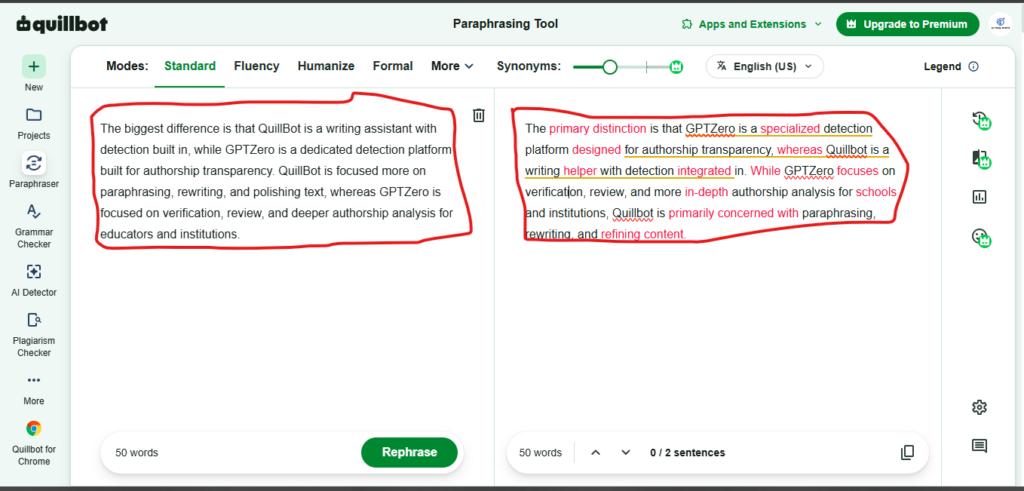
The most popular feature of Quillbot is this. The paraphrase tool rewrites your content by substituting synonyms for words and altering the sentence structure. The goal is to improve the clarity, style, or overall uniqueness of your work.
You get several modes to choose from, depending on what you need:
Free Modes: Standard and Fluency.
Premium Modes: Humanizer, Formal, Academic, Simple, Creative, Expand, Shorten, and even a Custom mode you can set up yourself.
Pros: It’s actually useful for overcoming writer’s block, correcting poor phrases, and assisting non-native English speakers in finding the appropriate words. It can help you see your own writing from a new angle.
Cons: One typical concern is that your writing may start to sound robotic if you rely too much on it. Some users believe that following its recommendations without question can make the material seem a touch generic by removing your personal voice. It’s a tool that functions best when you make your own decisions.
Grammar checker and AI detector
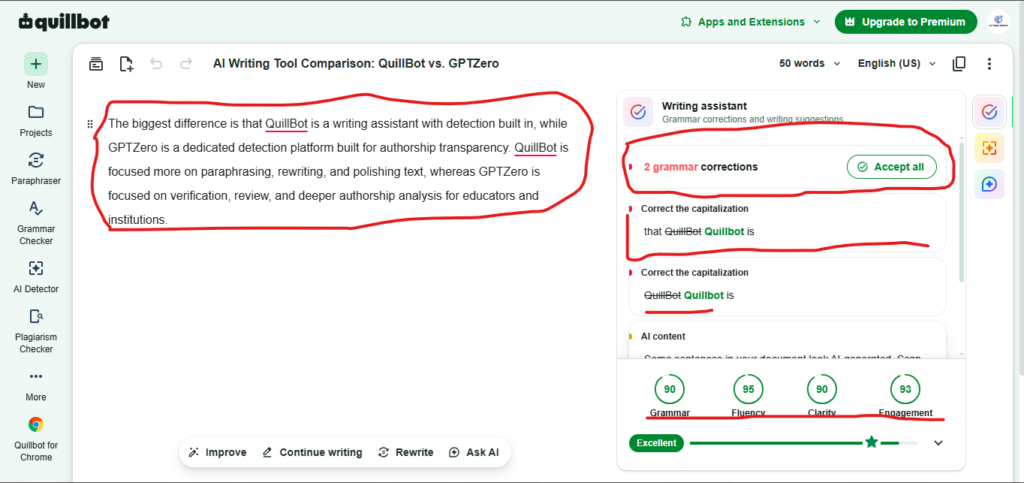
Additionally, Quillbot contains a Grammar Checker that detects errors in grammar, punctuation, and spelling. The fact that it is multilingual—English, German, French, and Spanish—is a pleasant feature.
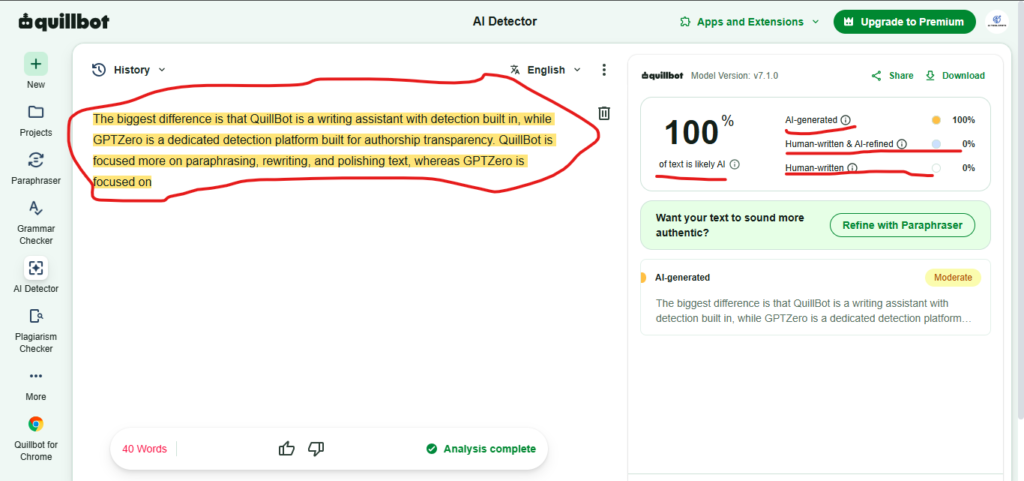
The AI Detector, on the other hand, is made to identify text produced by AI models such as Gemini or ChatGPT. A technology like this can be helpful for verifying authenticity in a time where AI material is prevalent.
Limitations:
- Although the Grammar Checker is helpful, many users believe that specialized programs like Grammarly are more powerful. It may overlook more subtle faults, but it will detect the glaring ones.
- In general, AI detectors are not always trustworthy. It can be annoying if you’ve spent hours writing something yourself because they occasionally flag human-written material as AI-generated (a false positive).
Plagiarism checker: A premium feature with limitations
Quillbot has a plagiarism checker, but you have to pay for a premium membership to use it. To help you avoid unintentional plagiarism, this program scans your text and compares it to a vast collection of academic papers and web pages.
That may seem like a lot, but you can soon exhaust that limit if you’re a teacher reviewing student papers, an editor, or a heavy writer. Users who must frequently review a large amount of text may find this word cap difficult.
Summarizer, translator, and citation generator
A lengthy article or document can be reduced to its essential elements using the Summarizer. While premium users can access up to 5,000 words at once, free users are only allowed 1,300.
The Translator translates text between more than 51 languages as you may imagine. For rapid, on-the-spot translations, it is helpful.
Lastly, academics and students can greatly benefit from the Citation Generator. It makes bibliographies easier by producing citations in more than 1,000 formats, such as APA, MLA, and Chicago.
Both scholars and students can benefit greatly from these resources. However, they are more of a nice-to-have than a daily necessity for the majority of marketers, business bloggers, and professional writers.
Quillbot pricing: Free vs. premium plans
For minor work, Quillbot’s free plan is helpful, but you must pay to Premium to get all the features. Here’s a graphic summary of everything you get with each plan to help you understand the differences:
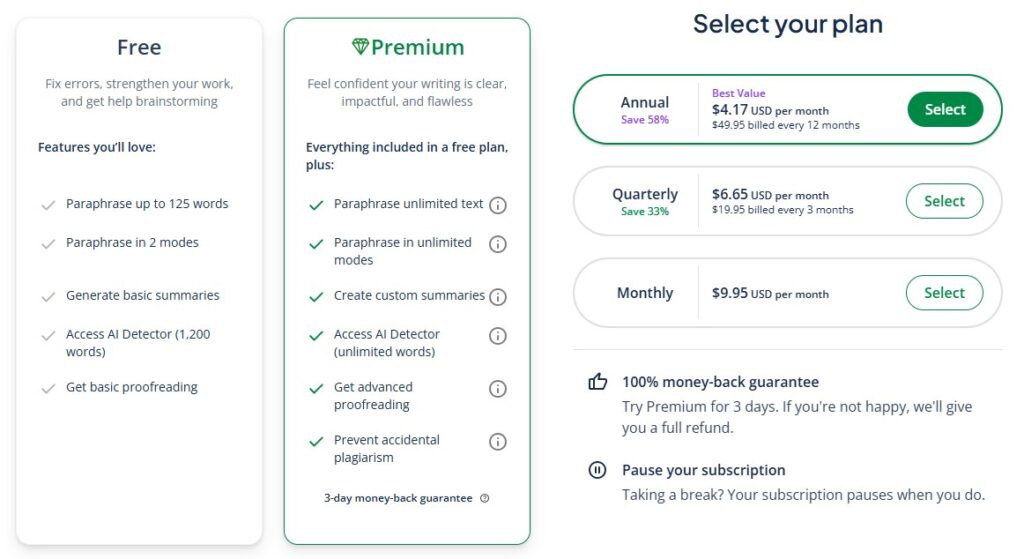
Here are the full pricing tiers as of late 2026:
- Monthly: $19.95 per month
- Quarterly: $13.31 per month (billed as $39.95 every 3 months)
- Annual: $8.33 per month (billed as $99.95 annually)
For little, infrequent modifications, the free plan works well. It’s ideal if you only need to reword a few paragraphs. For content experts, however, the usefulness of the Premium plan is questionable. It is less useful for anyone creating content on a wide scale due to the limitations on important capabilities, particularly the Plagiarism Checker.
AI Tool Spots blog writer: A Quillbot alternative
Quillbot is a great tool for editing material you’ve already written. However, what if producing the content in the first place is more difficult than editing? You need a program that manages the complete workflow for that.
The AI Tool Spots blog writer can help with that. It’s a substitute made especially for producing whole articles rather than just editing them.
The primary distinction is straightforward: text is not fed to AI Tool Spots for editing. You give it a single keyword, and it returns a comprehensive, media-rich, SEO-optimized blog entry. In just three months, our own blog’s daily impressions increased from 700 to over 750,000 thanks to this identical strategy.
Here are a few key things AI Tool Spots does that Quillbot doesn’t:
Automatic Asset Generation: It saves you the trouble of locating or creating visuals by creating photos, charts, and tables and placing them directly in the text.
Authentic Social Proof: It automatically extracts pertinent YouTube videos and Reddit quotes to boost your content’s authority and engagement.
Context-Aware Research: After analyzing your website to determine your brand language, it can organically incorporate genuine, non-forced product mentions.
End-to-End Automation: It can save you hours of tedious research, writing, and formatting by taking you from a basic keyword to a publish-ready document in a matter of minutes.
Final verdict: Is Quillbot worth it?
For its target audience of academics, students, and anyone who wants to swiftly polish short bits of writing, Quillbot is a reliable tool. For academic writing, the citation generator saves a ton of time, and the paraphrasing tool is really effective.
However, there are certain restrictions that professional content producers should take into account. Essentially, it is a text refiner rather than a content creator. Furthermore, anyone dealing with a large amount of content may find the usage restrictions on premium tools like the Plagiarism Checker to be a major hindrance.
Here’s our final recommendation:
- Use Quillbot if: You may be a professional who has to rapidly reword an email, a student working on an essay, or someone who wants to get better at writing one sentence at a time.
- Look for an alternative if: As a blogger, marketer, or business owner, your goal is to increase the volume of material you produce in order to increase organic traffic. A real content creation tool, such as the AI Tool Spots blog writer, is a far better option for that.
This video review from Digital Creator Avi explores Quillbot’s capabilities and assesses whether it’s still a worthy investment for a deeper look at how it functions in real-world scenarios.
FAQ
Is QuillBot AI Detector free?Indeed, Quillbot provides limited access to its AI Detector with the free plan. AI detection is available for up to 1,200 words in the free version; however, premium plans offer infinite words.
How accurate is QuillBot’s AI Detector?Quillbot’s accuracy, according to independent tests conducted by journalists, is about 80%. However, like with any AI detection techniques, the results vary depending on the nature and length of the text. When text was truly produced by humans, Quillbot might be more likely to anticipate AI, increasing the possibility of false positives.
Can QuillBot detect ChatGPT writing?Indeed, Quillbot claims that their AI Detector is based on a unique model architecture intended to identify text produced by ChatGPT, Gemini, Claude, and other AI platforms. Additionally, it claims to be able to recognize not only entirely AI-generated content but also paraphrased language, AI rewrites, and hybrid human-AI writing.
What’s the difference between QuillBot and GPTZero?The primary distinction is that GPTZero is a specialized detection platform designed for authorship transparency, whereas Quillbot is a writing helper with detection integrated in. While GPTZero focuses on verification, review, and more in-depth authorship analysis for schools and institutions, Quillbot is primarily concerned with paraphrasing, rewriting, and refining content.

AI Tool Spots is a technology-focused platform dedicated to sharing the latest updates in Artificial Intelligence, software tools, automation, SEO, and digital innovation. We publish informative guides, honest reviews, tech tutorials, and valuable resources to help bloggers, entrepreneurs, marketers, and tech enthusiasts stay ahead in the digital world. Learn more at aitoolspots.com.