If you’re searching for an honest Otter.ai review before committing to a subscription, you’re reading the right article. I’ve been using Otter.ai for a full 12 months, not as a casual experiment, but as a working tool across real meetings: client calls, team standups, podcast recording, and webinars. Over that year, I’ve run hundreds of meetings through it, tested every plan tier, hit its limits in frustrating ways, and also watched it save me hours of manual note-taking every single week.
This isn’t a feature walkthrough based on Otter’s pricing page. It’s based on 12 months of actual use, the workflows that delivered real value, the limitations that genuinely frustrated me, the pricing gotchas nobody warms you about, and my honest verdict on whether Otter.ai worth your money in 2026.
What Is Otter.ai? (Quick Overview)
Otter.ai is an AI-powered meeting intelligence platform that automatically transcribes, summarizes, and organizes your conversations in real time. Founded in 2016, it has grown to over 10 million users — professionals, students, sales teams, and enterprise organizations — making it one of the most widely adopted AI meeting tools available.
The core experience centers on OtterPilot, an AI bot that joins your scheduled Zoom, Google Meet, or Microsoft Teams calls automatically, transcribes everything in real time, captures screenshots of shared slides, and generates structured summaries with action items once the call ends. You don’t need to remember to hit record — OtterPilot handles it from your connected calendar.
In 2026, Otter positions itself as more than just a transcription service. It’s built out into what it calls an AI Meeting Intelligence Platform — with features like AI Chat for querying your entire meeting history, CRM sync for sales teams, and the Otter Connect API v2 for deeper custom integrations.
My 12-Month Testing Experience
I started with the free Basic plan. The experience during the first week was genuinely impressive — I uploaded a few audio recordings, ran OtterPilot across two back-to-back client calls, and had clean, searchable transcripts ready within minutes of each call ending. The speaker identification was accurate enough that I could share transcripts directly without major cleanup.
By week three, I had hit the free plan’s limits. The 30-minute-per-conversation cap is the first wall most users hit — and it arrives faster than you’d expect. Any meeting running longer than half an hour gets cut off mid-conversation with zero warning during the call. I discovered this the hard way when a client presentation ran long and the last 15 minutes of discussion — including key decisions — wasn’t captured.
That experience pushed me to upgrade to Pro, and the difference in daily usability was immediate. The 90-minute-per-conversation cap on Pro covered every standard call I run, and the 1,200 monthly minutes gave me enough headroom for a full week of meetings without stress.
Over the following months, I tested Otter across different use cases — recording podcast interviews, capturing internal team syncs, and using the AI Chat feature to search across three months of archived meetings when a client asked about a decision made in an earlier call. That last use case genuinely impressed me: I typed a plain-language question (“what did we agree about the campaign timeline in the February calls?”) and Otter surfaced the relevant transcript segment within seconds. No scrolling, no re-listening to recordings.
By month eight, I’d also tested the Business plan for a period when I was collaborating with a small team. The unlimited live meeting transcription removed the monthly minute anxiety entirely, and the Salesforce sync worked cleanly for tracking client conversation context.
By month twelve, my overall picture was clear: Otter is excellent at its core job — real-time meeting capture and searchable archives — but it has meaningful limitations in language support, privacy posture, and pricing transparency that I’d want anyone to understand before subscribing.
Key Features of Otter.ai in 2026
1. OtterPilot (AI Meeting Bot)
OtterPilot is the flagship feature and the reason most people choose Otter. It joins your meetings automatically from your connected calendar — Google Calendar and Microsoft Outlook both supported — and starts transcribing without any manual intervention. During the call, live captions appear in real time on the Otter interface, and shared slide screenshots get captured automatically, giving you a visual record alongside the transcript.
One important operational note I learned from experience: OtterPilot joins as a visible participant in the meeting. Clients and external attendees will see it listed as “Otter Notetaker” in the participant list. For internal meetings this is a non-issue, but for first-time client calls or sensitive conversations, I always now notify participants in advance. This transparency is actually important — see the Privacy section below.
2. AI Transcription Accuracy
Otter’s transcription quality is its strongest asset. In quiet environments with clear audio — standard office calls, Zoom meetings with good microphones — I consistently experienced 93-95% accuracy, which is excellent for an AI transcription tool. Multiple speakers are handled well, with speaker diarization that correctly labels different participants most of the time.
The accuracy drops noticeably in noisier environments, with heavy accents, or when multiple speakers talk simultaneously. Technical terminology, proper nouns, and niche industry terms are hit-or-miss across every AI transcription tool — Otter is no different here. I found that reviewing transcripts for proper nouns (client names, product names, acronyms) was still necessary before sharing externally, even after 12 months.
3. AI Summaries and Action Items
After each meeting, Otter automatically generates a structured summary with a headline overview, organized discussion topics, and a categorized action item list with named owners where speaker attribution was detected. The summaries are shareable via link, exportable to PDF, and can sync to Salesforce or HubSpot records on Business and Enterprise plans.
In my experience, the summaries were accurate enough to share with clients in about 70-75% of cases. The other 25% needed light editing — usually because an action item was attributed to the wrong speaker or a key decision was captured in context but not surfaced in the summary. Reliable enough to save significant time, but not reliable enough to skip review entirely.
4. AI Chat (Meeting Q&A)
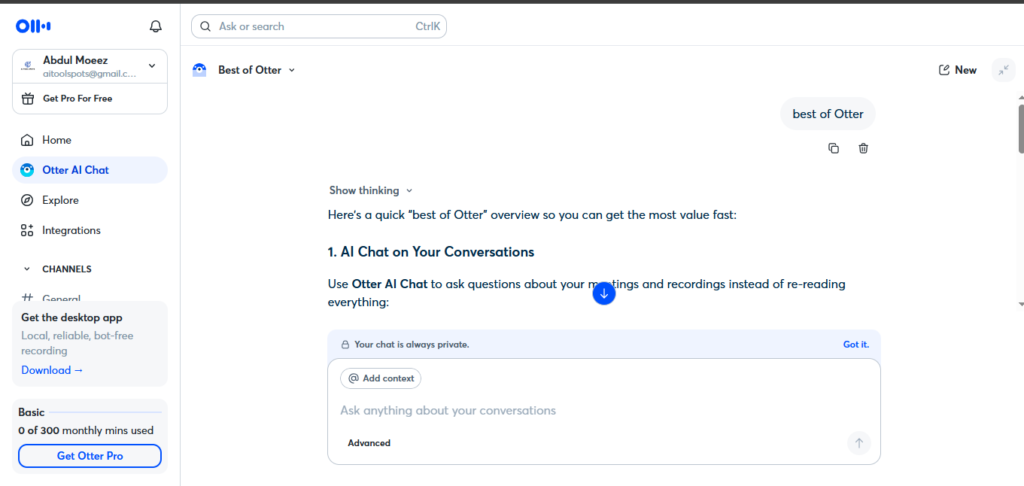
This feature became one of my most-used in the second half of my testing year. AI Chat lets you query your entire meeting history in plain language — asking things like “what were the deliverables agreed in last week’s call?” or “did we discuss pricing in the March meetings?” Otter searches across your archived transcripts and surfaces relevant segments with timestamps.
For anyone managing ongoing client relationships with frequent calls, this feature alone justified the Pro subscription for me. The alternative — scrolling through recordings manually or relying on memory — is significantly slower.
5. Integrations
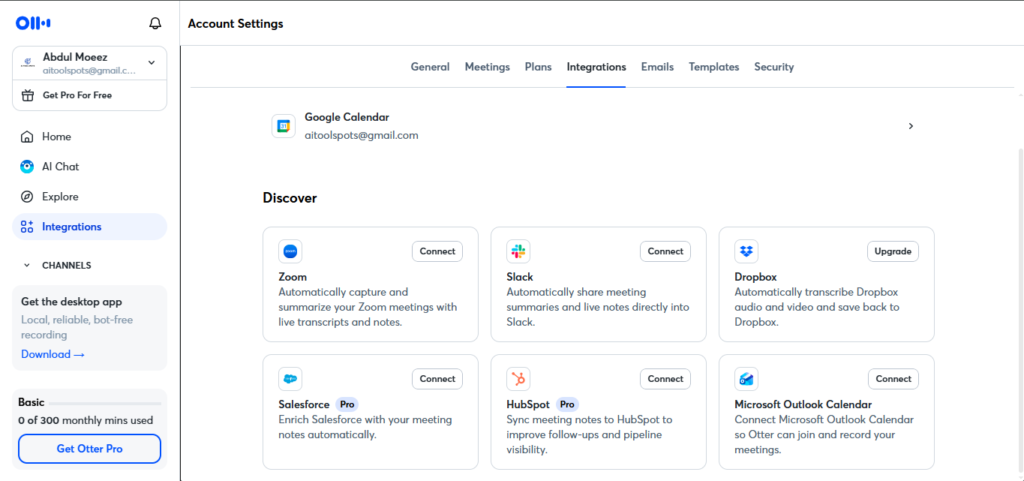
Otter connects with the major platforms I use daily:
- Video conferencing: Zoom, Google Meet, Microsoft Teams
- CRM: Salesforce, HubSpot (Business/Enterprise plans)
- Calendar: Google Calendar, Microsoft Outlook
- Communication: Slack (auto-posts transcripts after meetings)
- Storage: Dropbox, Box
- Automation: Zapier (for custom workflow connections)
The Zoom integration is the most polished in my experience — joining is seamless, sync is reliable, and the Slack post-meeting notification with transcript link became a standard part of my team workflow.
6. Language Support
This is one of Otter’s clearest limitations in 2026. Transcription is available in English, French, Spanish, German, Japanese, and Chinese. If your meetings happen in any other language — or you work with multilingual teams — Otter is not the right tool. Competitors like Fireflies.ai support over 100 languages, which is a meaningful gap for global teams.
Otter.ai Pricing in 2026
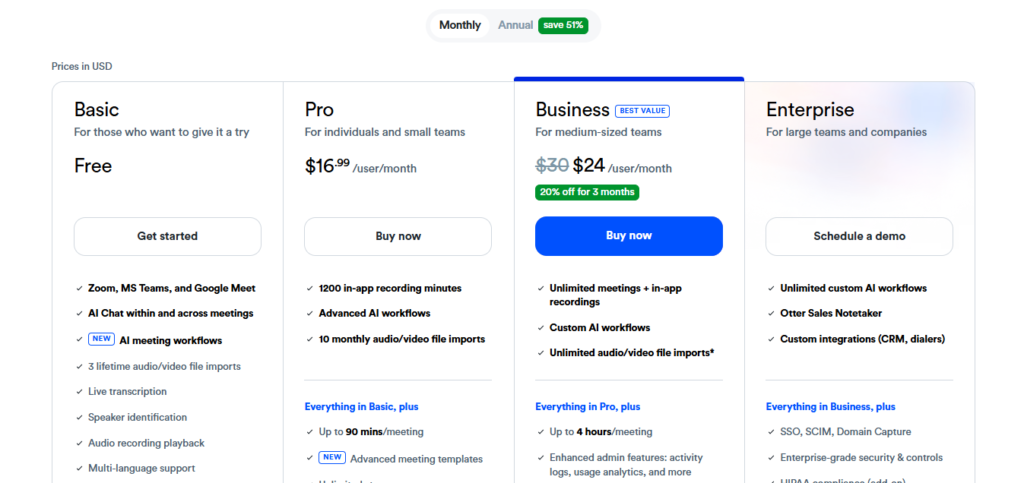
This section deserves careful attention, because the pricing looks simple on the surface but has real hidden complexity once you’re using the tool daily.
| Plan | Monthly Price | Annual Price | Key Limits |
| Basic (Free) | $0 | $0 | 300 min/month, 30 min/conversation, 3 lifetime file imports |
| Pro | $16.99/month | $8.33/month ($99.99/year) | 1,200 min/month, 90 min/conversation, 10 file imports/month |
| Business | $24/user/month | $19.99/user/month ($240/year) | Unlimited live meetings, 6,000 imported-file min/user, 4 hr/conversation |
| Enterprise | Custom | Custom | Full security controls, advanced analytics, SSO |
Student discount: Otter offers 20% off Pro plans for students and teachers with a .edu email — bringing the annual plan down to $6.67/month ($79.99/year).
The hidden limits most reviews miss:
The free plan’s “3 lifetime file imports” is the most misleading aspect of Otter’s free tier. That’s three file uploads total — ever — not per month. Most people testing the tool for the first time will use all three imports within the first few days and then hit a hard wall.
The Pro plan’s 10 file imports per month is also more restrictive than competitors like Fireflies.ai, which offers unlimited transcription on its Pro plan at $10/month. If you regularly upload recorded audio or video files for transcription, this limit matters more than the monthly minute cap.
Privacy: The Important Caveat in 2026
This section didn’t exist in most Otter.ai reviews from previous years, but in 2026 it’s relevant context anyone should know.
Otter.ai is currently named as the defendant in a consolidated federal class action — In re Otter.AI Privacy Litigation, in the Northern District of California — with the complaint alleging that OtterPilot records meeting participants who have not explicitly consented to being recorded. No court ruling has been issued, and Otter.ai continues operating normally. However, this is a live legal case, and teams with client-facing calls in privacy-sensitive industries should review their policies before enabling automatic recording.
My personal approach throughout testing: I notify all meeting participants in the calendar invite that Otter.ai will be taking notes, and OtterPilot’s visible presence in the participant list serves as an in-meeting reminder. This is both good practice and relevant to managing the consent question directly.
Who Should Use Otter.ai?
Based on 12 months of real daily use, here is my honest breakdown:
Great for:
- Professionals running frequent Zoom, Meet, or Teams calls who want automatic transcription without manual setup
- Sales teams using Salesforce or HubSpot who need meeting notes synced to CRM records automatically
- Content creators and podcasters who want searchable text archives of recorded conversations
- Students in English-language academic environments — the discounted Pro plan at $6.67/month is one of the best AI productivity values in the market
- Knowledge workers managing ongoing client relationships who need to query past meeting history quickly
Not ideal for:
- International teams needing transcription in more than six languages — Fireflies.ai (100+ languages) is a stronger choice
- Individual users who primarily upload files rather than joining live meetings — the file import limits on Pro (10/month) will frustrate heavy users
- Privacy-sensitive industries where automatic recording of all participants requires careful consent management
- Budget-conscious teams needing unlimited transcription — competitors like Fathom offer unlimited free transcription for individuals, and Fireflies Pro at $10/month offers unlimited transcription on their paid plan
Otter.ai Pros and Cons
Pros
- 93-95% transcription accuracy in standard audio conditions — best-in-class for AI transcription
- OtterPilot joins meetings automatically from calendar — zero manual setup per meeting
- AI Chat across your entire meeting history is genuinely powerful for knowledge retrieval
- Salesforce and HubSpot CRM sync saves meaningful admin time for sales teams
- Clean, intuitive interface — easy enough that non-technical team members adopt it without training
- Solid iOS and Android apps with offline playback and Siri shortcuts
Cons
- Free plan’s 30-minute conversation cap and 3 lifetime file imports are highly restrictive
- Only 6 supported languages — significant gap for global or multilingual teams
- OtterPilot’s visible bot presence requires proactive consent management for client-facing calls
- Privacy lawsuit (In re Otter.AI Privacy Litigation) is an unresolved consideration for compliance-sensitive teams
- Competitors offer unlimited transcription at similar or lower price points
Otter.ai vs Competitors
Otter.ai vs Fathom: Fathom offers unlimited free transcription for individual Zoom users — making it the strongest free alternative. Otter wins on AI Chat, CRM integration depth, and multi-platform support (Fathom is Zoom-only).
Otter.ai vs Fireflies.ai: Fireflies starts at $10/month Pro with unlimited transcription and 100+ language support. Otter’s transcription quality and interface are generally more polished, but Fireflies wins on language coverage and per-minute value.
Otter.ai vs Notta: Notta comes in around $9/month Pro with multilingual support — a stronger choice for non-English meeting environments. Otter’s speaker identification and summary quality are stronger for English-language calls.
Final Verdict: Is Otter.ai Worth It in 2026?
After 12 months of consistent, daily use, here is my honest answer: yes — with the right expectations.
Otter.ai is genuinely one of the best AI meeting tools for English-language teams running frequent Zoom, Google Meet, or Teams calls. The transcription accuracy is excellent, OtterPilot’s automatic join removes friction from the workflow entirely, AI Chat is a valuable long-term asset as your meeting archive grows, and the Salesforce/HubSpot sync delivers real time savings for sales-focused teams.
Where Otter falls short is clear: the free plan’s limits are more restrictive than most competitors, the language support is narrow for global teams, and the privacy lawsuit is context that compliance-sensitive teams should be aware of before deploying it broadly.
For individuals on the annual Pro plan at $8.33/month — especially students with access to the discounted $6.67/month rate — Otter is one of the better value AI productivity tools available in 2026. For teams already using Salesforce and running daily English-language meetings, the Business plan justifies its cost in admin time saved.
My Rating: 4.2 out of 5
Frequently Asked Questions
Is Otter.ai free to use in 2026? Yes. Otter.ai offers a free Basic plan with 300 transcription minutes per month. The key limits to know: conversations are capped at 30 minutes each, and you only get 3 lifetime file imports — not per month, but total. The free plan is enough to test the tool but too limited for consistent daily use.
How much does Otter.ai cost in 2026? Otter Pro costs $8.33/month billed annually ($99.99/year) or $16.99/month on monthly billing. Business is $19.99/user/month annually or $24/user/month monthly. Students with a .edu email get 20% off Pro — bringing the annual plan to $6.67/month.
How accurate is Otter.ai’s transcription? In standard audio conditions with clear speech and minimal background noise, Otter.ai delivers 93-95% accuracy — excellent for an AI transcription tool. Accuracy drops with heavy accents, simultaneous speakers, and technical or niche terminology.
What languages does Otter.ai support in 2026? Otter.ai supports English, French, Spanish, German, Japanese, and Chinese. If your meetings happen in other languages, alternatives like Fireflies.ai (100+ languages) or Notta are better options.
Is Otter.ai safe to use? Otter.ai is involved in an ongoing federal class action lawsuit (In re Otter.AI Privacy Litigation) related to recording consent. The tool is still fully operational, but teams with client-facing calls should proactively notify participants before OtterPilot joins a meeting. All audio is processed in the cloud — organizations with strict data residency requirements should review Otter’s Enterprise data policies before deploying.
What is the best free alternative to Otter.ai? Fathom offers unlimited free transcription for individual Zoom users — making it the strongest free alternative for budget-conscious users. For multilingual needs, Notta’s free tier covers more languages than Otter’s paid plans.
AI Tool Spots is a technology-focused platform dedicated to sharing the latest updates in Artificial Intelligence, software tools, automation, SEO, and digital innovation. We publish informative guides, honest reviews, tech tutorials, and valuable resources to help bloggers, entrepreneurs, marketers, and tech enthusiasts stay ahead in the digital world. Learn more at aitoolspots.com.