If you’re searching for an honest Synthesia review before committing your budget to it, I’ve got real experience to share — not just a list of features copied from the pricing page. I tested Synthesia for 10 months, using it for actual client deliverables: training videos, product explainer content, and multilingual marketing videos. I used the free tier first, then upgraded to a paid plan once I confirmed it could handle real production work.
The short version: Synthesia is genuinely one of the most mature AI avatar video platforms available in 2026, but it’s built for a specific type of user. If you fall outside that use case, you’ll likely be frustrated by the pricing and creative limitations. Let me walk you through exactly what I found.
What Is Synthesia?
Synthesia is an AI-driven video generation platform that turns written text into professional-looking videos featuring realistic AI avatars and voiceovers. Launched in 2017, it has grown into one of the most established names in AI video, used by companies including Zoom, Heineken, Bosch, Merck, SAP, and Mondelez.
The core idea is simple: you write a script, choose an avatar, pick a language, and Synthesia generates a video of that avatar speaking your script naturally — no camera, no actors, no studio required. It currently supports over 240 AI avatars and more than 160 languages, making it a strong choice for global, multilingual content production.
My 10-Month Testing Experience
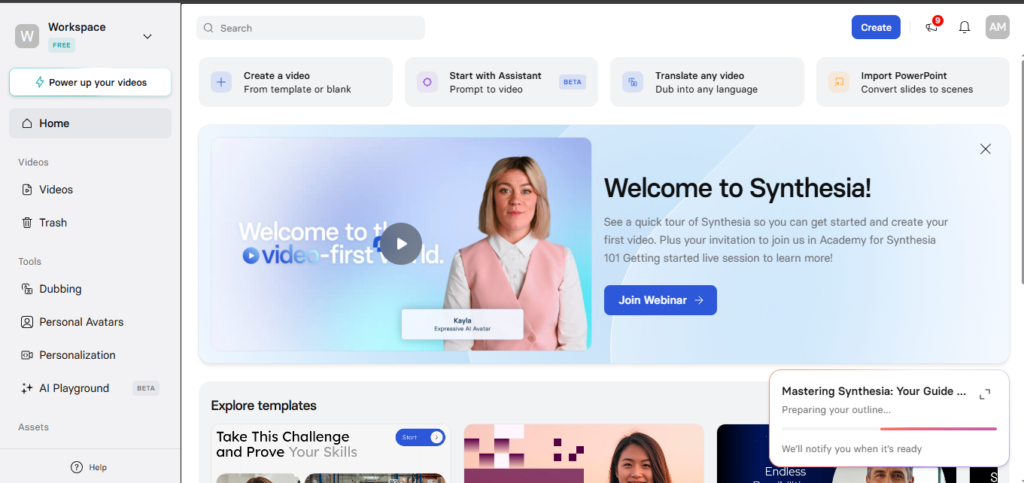
I started on free Basic plan, which gives you 3 minutes of video per month, just enough to test the core experience before spending anything. My first video was a short internal training clip, and I remember being genuinely surprised by how natural the lip-sync looked. It wasn’t perfect, but it was far closer to a real presenter than I expected from a text-to-video tool.
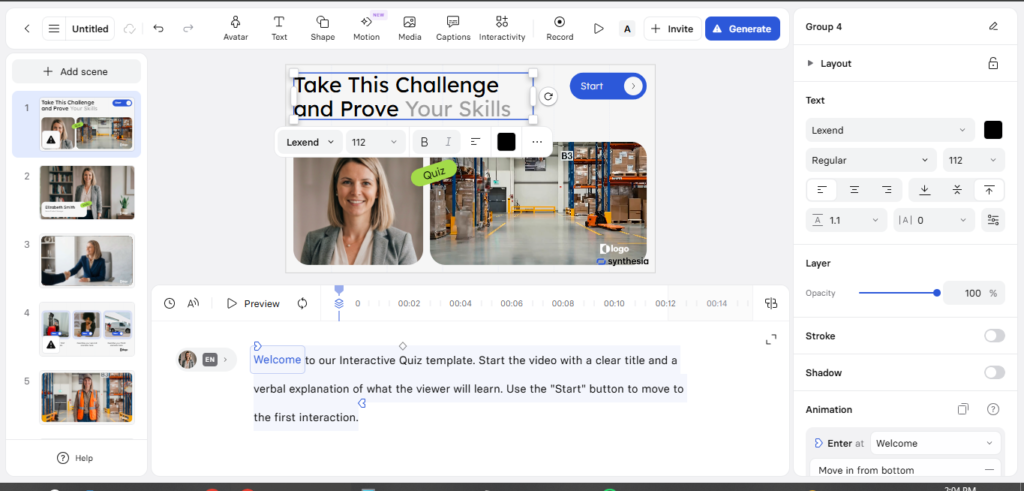
By month two, I upgraded to a paid plan to handle actual client work. The first real project was a multilingual product explainer for an e-commerce client — the same script, generated in English, Urdu, and Arabic, using three different avatars. This is where Synthesia genuinely impressed me. Recording the same video three times with human presenters would have taken days and a significant budget. Synthesia did it in under an hour.
Around month four, I tested the voice cloning feature, which took about 10-15 minutes to set up properly. Once configured, I could pair the cloned voice with any avatar in the library — useful for maintaining a consistent brand voice across multiple videos without re-recording anything.
By month six, I had produced enough videos to notice a recurring pattern: Synthesia is excellent for structured, script-based content — training modules, onboarding videos, policy update explainers — but it struggles with anything requiring genuine emotional range. I tried creating a testimonial-style video for a client that needed warmth and sincerity, and the avatar delivered the lines competently but without the emotional nuance a human presenter would bring naturally. I ended up reshooting that specific project with a real presenter instead.
By month ten, my overall impression had settled: Synthesia is a reliable, professional tool for the right kind of video — but it’s not a universal replacement for human-presented content.
Key Features of Synthesia in 2026
1. AI Avatars (240+)
The avatar library is the largest in the AI video space. You can choose from diverse, professional-looking presenters or build a custom avatar trained on your own likeness. During my testing, the top-tier avatars looked convincing roughly 85-90% of the time — close-up shots and direct-to-camera dialogue held up well,while side angles and rapid hand gestures occasionally revealed the AI origin.
2. Multilingual Support (160+ Languages)
This is where Synthesia genuinely shines. For any business creating training or marketing content for a global audience, generating the same video in a dozen languages without rehiring voice actors or presenters is a massive time and cost saver. I used this directly for client work and the quality stayed consistent across every language I tested.
3. Voice Cloning
Synthesia’s voice cloning feature lets you create a digital version of your own voice or a brand presenter’s voice in about 10-15 minutes. Once set up, it can be paired with any avatar — useful for maintaining brand consistency without needing the original speaker available for every new video.
4. Templates (250+)
The platform includes over 250 ready-to-use templates covering corporate training, marketing content, educational videos, and onboarding material. I customized several of these with client branding — colors, fonts, and backgrounds — and found the editing interface intuitive even without prior video editing experience.
5. Screen Recording and Text-to-Video
Beyond avatar videos, Synthesia includes basic screen recording capabilities and the ability to convert plain text or existing documents into video format, useful for repurposing blog content or internal documentation into video form quickly.
6. Enterprise Security and Compliance
For larger organizations, Synthesia includes SOC 2 Type II compliance, GDPR compliance, SAML/SSO support, and audit logs. This compliance story is a meaningful part of why it gets through enterprise procurement processes where smaller competitors struggle.
Synthesia Pricing in 2026
Synthesia’s pricing has actually become more competitive throughout 2026. Here’s the current breakdown:
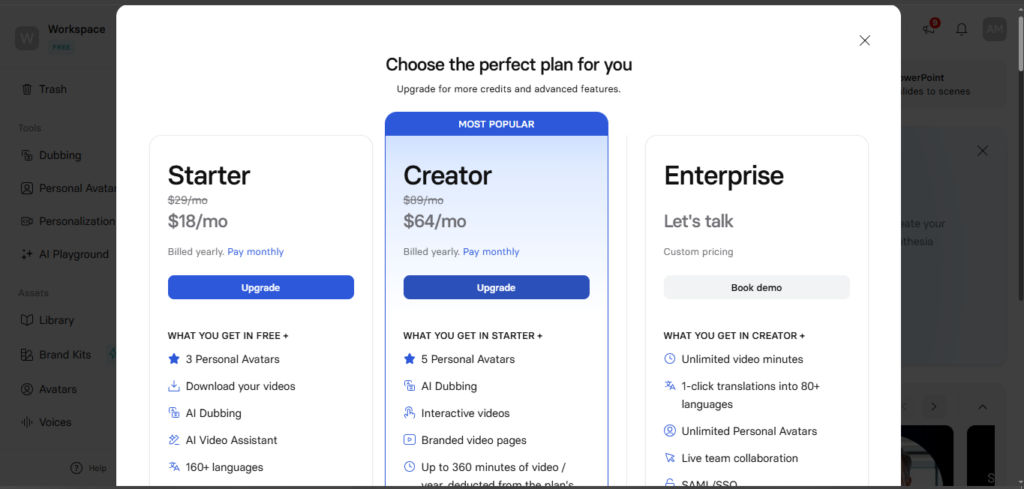
| Plan | Price | What You Get |
| Free | $0/month | 3 minutes of video per month, limited avatars and customization |
| Starter | $18/month (billed annually) | More video minutes, access to standard avatars, templates |
| Creator | $64/month (billed annually) | Higher minute limits, expanded avatar access, more customization |
| Enterprise | Custom pricing | Unlimited seats, dedicated CSM, advanced security, API access |
It’s worth noting that Synthesia recently reduced its pricing — the Starter plan dropped from $29/month to $18/month annually, and Creator dropped from $89/month to $64/month, making the platform notably more competitive against newer AI avatar tools entering the market.
My honest take on pricing: for individual creators or small businesses making occasional videos, this pricing is steep relative to the actual usage you get. The free tier’s 3-minute limit is genuinely restrictive — you’ll hit it almost immediately with any real project. For businesses producing regular training or multilingual corporate content, though, the time saved compared to traditional production easily justifies the cost.
Who Should Use Synthesia?
Based on 10 months of real production use, here’s who actually benefits from this tool:
Great for:
- HR and training managers who need consistent onboarding and educational videos that can be quickly updated when policies change
- Marketing professionals producing regular video content for social media, product launches, or advertisements without hiring a production team
- Global businesses needing the same message delivered consistently across multiple languages
- Small business owners who want professional video content but lack the budget for traditional video production
Not ideal for:
- Creators needing emotional, expressive content — testimonials, storytelling, or anything requiring genuine emotional range
- Budget-conscious individual creators — the pricing structure favors regular business use over occasional personal projects
- Anyone needing fast, casual social content — the structured, corporate style of Synthesia’s avatars doesn’t fit informal or highly creative content well
Synthesia Pros and Cons
Pros
- Largest and most polished avatar library in the AI video space
- Genuinely impressive multilingual support across 160+ languages
- Voice cloning is fast to set up and pairs well with any avatar
- Strong enterprise security and compliance credentials (SOC 2, GDPR, SSO)
- Editing interface is intuitive even without video production experience
- Significant cost and time savings compared to traditional video production for script-based content
Cons
- Pricing is expensive relative to actual usage limits, especially for individuals and small budgets
- Avatars can feel emotionally flat — fine for training content, weak for storytelling or testimonials
- Free tier’s 3-minute monthly limit is restrictive for any real testing
Synthesia vs Competitors
Synthesia vs HeyGen: HeyGen tends to deliver more expressive, natural-looking avatars at a more creator-friendly price point, making it a better fit if marketing content with personality is your priority. Synthesia still wins on overall avatar realism and enterprise readiness.
Synthesia vs Colossyan: This is the closest direct competitor for corporate training use cases. Synthesia generally has the edge in avatar quality, while Colossyan tends to offer more competitive pricing and stronger structured e-learning features like quizzes and SCORM packaging.
Synthesia vs Filmora: These serve different purposes entirely. Filmora is a broader AI-powered video editor covering text-to-video, AI music, and visual effects — better suited to general creative video work. Synthesia remains focused specifically on script-based avatar videos at scale.
Is Synthesia Worth It in 2026?
After 10 months of genuine production use, my honest answer is: yes, if you fall into the right category of user.
Synthesia is the most mature platform available for large-scale corporate, educational, and HR video production. If your business needs consistent, multilingual, script-based video content — training modules, onboarding material, policy updates, or product explainers — the time and cost savings compared to traditional filming are substantial. I personally cut production time on multilingual client projects from days to under an hour using this platform.
However, if your goal is anything outside that lane — expressive marketing content, emotional storytelling, or casual social videos on a tight budget — Synthesia’s structured approach and pricing will likely feel limiting. In those cases, a tool like HeyGen for more natural avatars or Filmora for broader creative flexibility may serve you better.
My Rating: 4.4 out of 5
Frequently Asked Questions
Is Synthesia free to use?
Synthesia offers a free Basic plan with 3 minutes of video per month. It’s useful for testing the platform but too limited for any serious production work.
How much does Synthesia cost in 2026?
Paid plans start at $18/month (Starter, billed annually) and go up to $64/month (Creator, billed annually). Enterprise pricing is custom and includes additional security and support features.
Does Synthesia support multiple languages?
Yes. Synthesia supports over 160 languages, making it one of the strongest options available for businesses producing multilingual training or marketing content.
Are Synthesia’s AI avatars realistic?
Top-tier avatars look convincing in most direct-to-camera shots, with realism estimated around 85-90%. Side angles, rapid gestures, and emotionally complex content are where the AI origin becomes more noticeable.
Is Synthesia good for marketing videos?
It depends on the type of marketing content. For structured product explainers and corporate-style ads, Synthesia works well. For expressive, emotional, or highly creative marketing content, alternatives like HeyGen may produce more natural results.
What is Synthesia’s voice cloning feature?
Voice cloning lets you create a digital replica of a voice in about 10-15 minutes, which can then be paired with any avatar in the library — useful for maintaining consistent branding across multiple videos.

AI Tool Spots is a technology-focused platform dedicated to sharing the latest updates in Artificial Intelligence, software tools, automation, SEO, and digital innovation. We publish informative guides, honest reviews, tech tutorials, and valuable resources to help bloggers, entrepreneurs, marketers, and tech enthusiasts stay ahead in the digital world. Learn more at aitoolspots.com.